Website uptime is defined as the percentage of time your site is available and accessible to visitors, and for freelancers, it is the single most visible measure of professional reliability. When a potential client clicks your portfolio link and gets an error page, that opportunity is gone. Understanding why website uptime matters for freelancers goes beyond technical curiosity. It directly shapes your ability to generate leads, rank on Google, and keep existing clients confident in your work. Tools like UptimeRobot and Notifier.so exist precisely because downtime hurts revenue, user trust, and search visibility in ways that compound over time.
Why website uptime matters for freelancers and their leads
Your website is your storefront, your resume, and your sales funnel all in one. When it goes down, every one of those functions stops working simultaneously.

Visitors who encounter error or timeout pages rarely return. That is not a minor inconvenience. For a freelancer, a single lost inquiry could represent a $2,000 project, a long-term retainer, or a referral chain that never starts.
The impact of downtime on freelancers is especially sharp because you have no sales team to catch the overflow. Consider what happens during a typical downtime event:
- A prospect finds your site through Google and clicks through, only to see a 503 error.
- A returning client tries to review your portfolio before a meeting and cannot load the page.
- A referral from a colleague visits your contact form and gets a timeout, then moves on to the next name on the list.
- You find out about all of this hours later, when a client mentions it in passing.
That last point is the most damaging part. Without monitoring, downtime is often detected only after client complaints, which means the damage is already done before you can act. Monitoring tools like UptimeRobot reduce detection time from hours to minutes, giving you a real chance to respond before the situation escalates.
Pro Tip: Set up SMS or email alerts through UptimeRobot or Notifier.so so you know about downtime the moment it happens, not when a client tells you.
How does downtime hurt freelancers’ SEO rankings?
Search engine optimization is a long game, and downtime quietly undermines it in ways most freelancers do not notice until the damage is done.
Repeated crawl errors reduce Google’s crawl frequency for your site and delay indexing of new content. Google’s crawlers visit your site on a schedule. When they encounter errors repeatedly, they interpret your site as unreliable and reduce how often they check it. Pages that were ranking can be dropped from the index entirely if downtime is prolonged.
The most frustrating part of this dynamic is the recovery timeline. SEO recovery after downtime takes weeks, even after your site is fully restored. Google does not instantly re-trust a site that was previously unreliable. Organic traffic, which many freelancers depend on for inbound leads, can stay suppressed long after the technical issue is resolved.
“Downtime impacts SEO gradually and subtly. Improving uptime leads to gradual organic recovery rather than instant ranking changes.” — Uptrack
Prevention is the only cost-effective strategy here. Fixing downtime after it happens is far more expensive in lost rankings and recovery time than preventing it with proper hosting and monitoring in the first place. Freelancer website performance is not just about page speed. It includes availability, and Google measures both.
Key SEO risks from downtime include:
- Reduced crawl budget allocation from Google
- Delayed indexing of new portfolio pieces or blog posts
- Potential removal of pages from search results during extended outages
- Loss of organic traffic that takes weeks to recover after restoration
How do status pages build client trust for freelancers?
Proactive communication is the fastest way to turn a stressful downtime event into a trust-building moment. Status pages make that possible without requiring you to be available around the clock.
A status page is a public URL that displays your site’s current operational status and any ongoing incidents. When something goes wrong, clients can check the status page themselves instead of sending you a panic email at midnight. Status pages reduce client panic and communication overhead by automatically updating incident status 24/7, even when you are unavailable.
The psychology here matters. Clients feel in control and less anxious when a status page shows that an issue is being investigated and resolved. That transparency signals professionalism. It tells the client you have a system, not just a reaction.
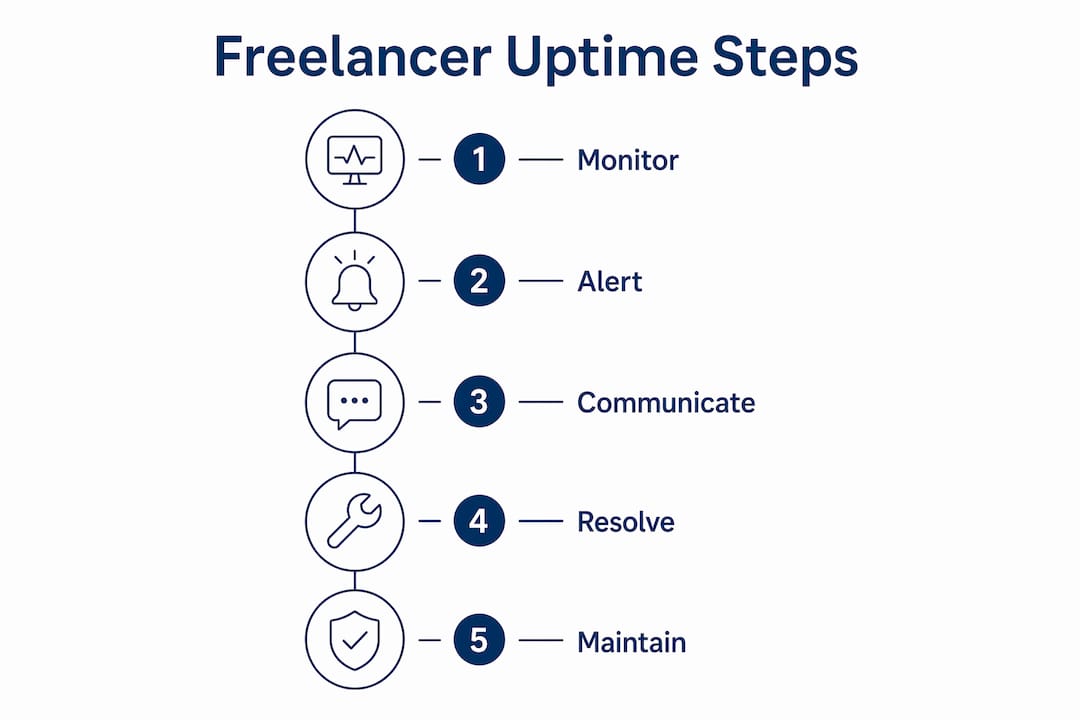
Here is a practical workflow for setting up client communication around downtime:
- Create a status page using a tool like PerkyDash or a similar service and share the URL with every active client.
- Configure your monitoring tool to automatically post incident updates to the status page when downtime is detected.
- Set a personal rule: if downtime exceeds 10 minutes, send a brief direct message to affected clients linking to the status page.
- After resolution, post a short post-mortem update on the status page explaining what happened and what was fixed.
Proactive transparency through status pages prevents clients from assuming neglect and reduces support tickets. Freelancers who use this approach report fewer panic emails and stronger long-term client relationships.
Pro Tip: Include your status page URL in your client onboarding documents so clients know where to check before they reach out to you during an incident.
What does a practical monitoring setup look like for freelancers?
Website reliability for freelancers does not require a full IT department. A focused monitoring setup covering four key areas gives you strong protection without complexity or high cost.
HTTP uptime checks every 60 seconds form the baseline. These checks ping your site continuously and alert you the moment it stops responding. Most monitoring tools, including UptimeRobot’s free tier, support this interval.
Beyond basic availability, SSL certificate and domain expiry monitoring prevent two of the most embarrassing and avoidable failures a freelancer can experience. An expired SSL certificate triggers browser security warnings that block visitors entirely. An expired domain takes your site offline completely. Both are preventable with a simple expiry alert set 30 days in advance.
The table below compares the core monitoring checks every freelancer should have in place:
| Check type | What it monitors | Why it matters | Recommended tool |
|---|---|---|---|
| HTTP uptime | Site availability every 60 seconds | Catches outages immediately | UptimeRobot, Notifier.so |
| SSL certificate expiry | Days until certificate expires | Prevents security warnings | UptimeRobot, PerkyDash |
| Domain registration expiry | Days until domain expires | Prevents total site loss | Marcorphosting domain management |
| Response time | Page load speed in milliseconds | Catches slow performance before it becomes downtime | UptimeRobot |
| Keyword monitoring | Presence of specific text on a page | Detects broken pages that still load | UptimeRobot |
For freelancers managing client sites, the monitoring scope expands. WordPress sites benefit from checks that detect plugin conflicts or broken pages that still return a 200 status code. E-commerce sites need checkout flow monitoring, because a broken payment page is functionally the same as downtime for the client’s revenue. Marcorphosting’s hosting infrastructure is built to support these reliability requirements from the server level up, which reduces the frequency of incidents you need to monitor for in the first place.
Maximizing website uptime for success means monitoring real user experience, including HTTP errors and slow response times, not just raw server availability. A server can be running while a misconfigured application serves error pages to every visitor. Your monitoring setup needs to catch both.
Key Takeaways
Website uptime is the foundation of a freelancer’s professional credibility, and fast detection of downtime limits business damage more effectively than chasing perfect uptime statistics.
| Point | Details |
|---|---|
| Uptime defines your reputation | Visitors who see error pages rarely return, and lost inquiries directly reduce your revenue. |
| Downtime damages SEO for weeks | Google reduces crawl frequency after repeated errors, and rankings recover slowly after restoration. |
| Status pages reduce client panic | Automated status updates build trust and cut support emails during incidents. |
| Monitor SSL and domain expiry | Expired certificates and domains cause immediate, avoidable outages that harm your credibility. |
| Fast detection beats perfect uptime | Minimizing time-to-awareness limits damage more than obsessing over uptime percentages. |
What I’ve learned about uptime after years of managing freelance sites
Most freelancers focus on uptime percentage as the goal. I used to think the same way. The real metric that matters is time-to-awareness: how quickly do you know something is wrong?
A site that goes down for 20 minutes while you are asleep and comes back up on its own is a non-event if no client noticed. A site that goes down for 45 minutes during business hours while you are in a client call, and you only find out when the client mentions it, is a credibility problem. The difference is not the duration. It is whether you knew first.
Automated status pages changed how I handle client relationships during incidents. Clients who can see “We are aware of this issue and investigating” feel cared for, not abandoned. That single shift reduced the number of anxious client messages I received during downtime events dramatically. It also freed me to actually fix the problem instead of managing communication at the same time.
The other lesson I would share is this: monitoring is a recurring revenue opportunity for freelancers. Offering a monthly website care plan that includes uptime monitoring, SSL management, and domain renewal tracking is a natural upsell. Clients value it, it is low-effort to deliver with the right tools, and it keeps you in regular contact with your client base. That contact is where referrals come from.
If you want to build a freelance business that feels stable rather than reactive, start with your hosting foundation. Everything else, including monitoring, status pages, and SEO recovery, gets easier when your server is reliable to begin with.
— Marco
Marcorphosting keeps your freelance site online and working
Reliable hosting is the first layer of uptime protection, and Marcorphosting is built specifically for professionals who cannot afford unexpected downtime.
Marcorphosting’s infrastructure includes dedicated servers like the HPE DL360 G10 dedicated server, designed for consistent performance under real-world load. For freelancers managing multiple client sites, the Ultimate Reseller Plan provides the hosting capacity and control to keep every site available. Marcorphosting also offers custom web design and e-commerce services that are built with performance and reliability in mind from day one. If you are ready to put your uptime on a solid foundation, reach out to the Marcorphosting team to find the right plan for your freelance business.
FAQ
What is website uptime and why does it matter for freelancers?
Website uptime is the percentage of time your site is available to visitors. For freelancers, it directly affects lead generation, client trust, and search rankings, because a site that is down cannot convert visitors into clients.
How does downtime affect a freelancer’s Google rankings?
Repeated downtime causes Google to reduce crawl frequency and can result in pages being dropped from the index. SEO recovery after downtime takes weeks, making prevention far more cost-effective than repair.
What is the fastest way for a freelancer to detect downtime?
Setting up HTTP monitoring checks every 60 seconds through tools like UptimeRobot or Notifier.so reduces detection time from hours to minutes. Instant SMS or email alerts mean you know about issues before your clients do.
What is a status page and do freelancers need one?
A status page is a public URL that displays your site’s current operational status and incident updates. Freelancers who use status pages report fewer client panic emails and stronger trust, because clients can see issues are being addressed without needing to contact you directly.
How can monitoring SSL and domain expiry prevent downtime?
Expired SSL certificates trigger browser security warnings that block visitors, and expired domains take sites offline entirely. Monitoring expiry dates with alerts set 30 days in advance prevents both failures before they affect clients.





0 Comments