Securing a small business website means protecting every layer of your site, from the server and domain account to the login page and payment form, so customer data stays private and your reputation stays intact. Trust is the new currency online, and a single breach can cost you both. The tools and frameworks that make this achievable, including SSL/TLS certificates, multi-factor authentication (MFA), Web Application Firewalls (WAF), and the NIST Cybersecurity Framework for small businesses, are more accessible than most owners realize. You do not need a dedicated IT team to get this right.
What does it take to secure a small business website?
The foundation of small business cybersecurity is a set of tools and access controls that work together. No single product solves everything. You need a layered approach that covers your hosting environment, your admin accounts, and your site’s public-facing code.
The core security infrastructure every small business needs:
- SSL/TLS certificate: Encrypts data between your visitor’s browser and your server. Without it, browsers flag your site as “Not Secure,” which kills conversions before they start.
- MFA on all admin accounts: Applies to your CMS (WordPress, Shopify, Squarespace), your hosting control panel, and your domain registrar account.
- Web Application Firewall (WAF): Filters incoming traffic and blocks attacks like SQL injection and cross-site scripting (XSS) before they reach your site.
- Vulnerability scanner: Tools like Sucuri SiteCheck or Wordfence scan for known malware, outdated software, and blacklist status.
- Backup solution: Automated daily backups stored offsite or in cloud storage (Google Cloud, Amazon S3, or your hosting provider’s backup service).
| Tool Category | Example Tools | Primary Function |
|---|---|---|
| SSL/TLS Certificate | Let’s Encrypt, Comodo, DigiCert | Encrypts site traffic |
| WAF | Cloudflare, Sucuri, Wordfence | Blocks malicious web traffic |
| Vulnerability Scanner | Sucuri SiteCheck, Wordfence | Detects malware and weak points |
| Backup Solution | UpdraftPlus, JetBackup, Amazon S3 | Enables recovery after incidents |
| MFA Tool | Google Authenticator, Authy | Secures admin login access |
Your hosting provider is the first line of defense before any of these tools even activate. A host that offers server-level firewalls, DDoS protection, and automatic updates removes a significant burden from your plate.

Pro Tip: Before buying any security plugin, check what your hosting plan already includes. Many managed hosting providers bundle WAF protection, malware scanning, and SSL certificates. Paying twice for the same layer is a common and avoidable mistake.
Step-by-step: how to protect your business online
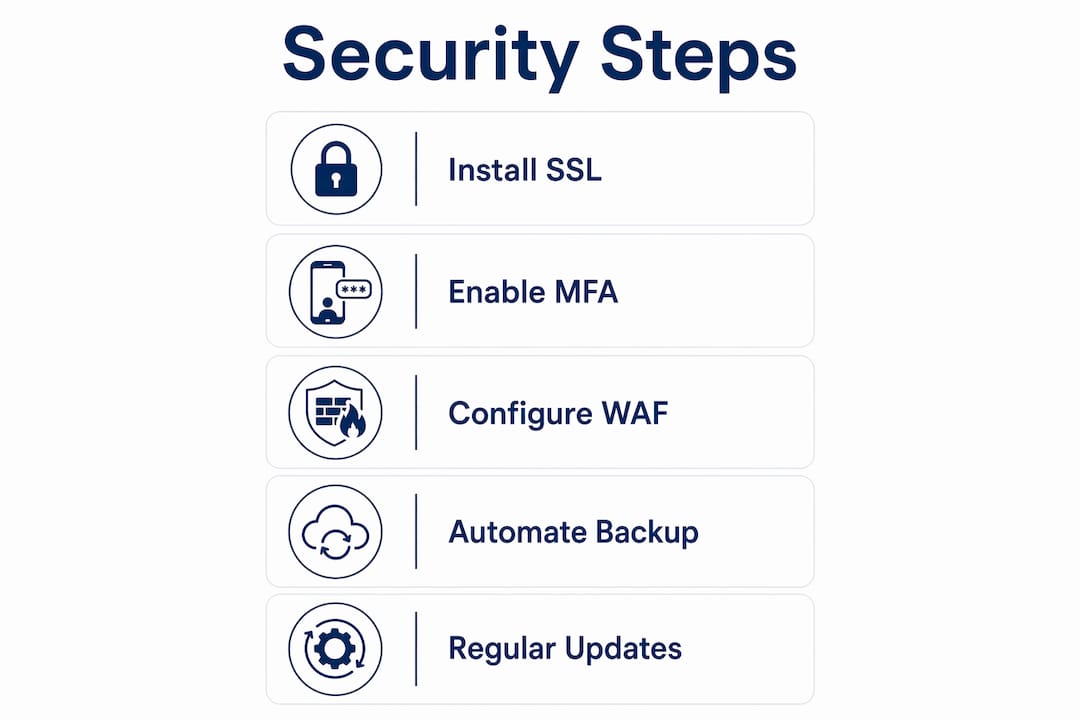
These steps follow a logical order. Complete them in sequence and you will cover the most critical attack surfaces first.
-
Enable HTTPS and install an SSL certificate. Your hosting provider or domain registrar can install a free Let’s Encrypt certificate in minutes. If you handle payment data, a paid certificate from Comodo or DigiCert adds an extra layer of validation. HTTPS is non-negotiable for any site collecting customer information.
-
Update your platform, plugins, and themes immediately. Routine software updates close the vulnerabilities attackers exploit most often. WordPress sites with outdated plugins are among the most commonly compromised. Set updates to run automatically where possible, and review your plugin list quarterly to remove anything unused.
-
Enable MFA on every admin account. Microsoft Security identifies MFA as the single most effective protection for small businesses without dedicated IT staff. Apply it to your CMS login, your hosting control panel, and your domain registrar. Use an authenticator app like Google Authenticator or Authy rather than SMS codes, which are easier to intercept.
-
Deploy a Web Application Firewall. PCI DSS Requirement 6.4.3 mandates WAF deployment for public-facing e-commerce applications when secure coding alone cannot fully close vulnerabilities. Even if you are not processing card payments directly, a WAF from Cloudflare or Sucuri blocks the most common automated attacks. Configure it to log blocked requests so you can spot patterns over time.
-
Set up automated backups with offsite storage. Regular backups stored in a separate location are your recovery plan when everything else fails. Use UpdraftPlus or JetBackup to schedule daily backups. Store copies in Amazon S3 or Google Cloud, not just on the same server as your site.
-
Run a vulnerability scan before and after major changes. Sucuri SiteCheck is free and takes under a minute. Run it after installing new plugins, switching themes, or adding third-party scripts. Wordfence offers deeper scanning for WordPress sites and alerts you to file changes that could indicate a compromise.
-
Limit admin access to the people who genuinely need it. Restricting login permissions reduces your attack surface and limits the damage any single compromised account can cause. Assign roles carefully in WordPress (editor vs. administrator), and remove access immediately when a team member leaves.
Pro Tip: Your domain registrar account controls where your website points. If an attacker gets into that account, they can redirect your entire site without touching your server. Lock it down with MFA and a unique, strong password before anything else.
How to maintain your website security over time
One-time setup is not enough. Small business cybersecurity works best as a repeatable program, not a checklist you complete once and forget. The NIST Cybersecurity Framework 2.0, detailed in NIST CSWP 50, gives small businesses a practical structure built around five functions: Identify, Protect, Detect, Respond, and Recover. You can apply this cycle without any IT background.
Ongoing security practices that keep your site protected:
- Monthly security audits: Review your plugin list, user accounts, and access logs. Remove anything outdated or unused.
- Quarterly penetration testing: Tools like WPScan (for WordPress) or a professional service test your site the way an attacker would. Even annual testing catches issues that routine scans miss.
- Staff phishing awareness: The FTC’s 2026 cybersecurity guidance for small businesses specifically calls out phishing and email authentication as priority areas. Train anyone who has access to your site or business email to recognize suspicious messages.
- Vendor security reviews: Every third-party plugin, payment gateway, or SaaS tool you connect to your site is a potential entry point. Review each vendor’s security practices annually and remove integrations you no longer use.
- WAF and plugin log monitoring: Your WAF dashboard shows blocked attacks in real time. Check it weekly. A sudden spike in blocked requests often signals an active scanning campaign targeting your site.
“Security is as much about processes and vendor management as it is about technology. Small businesses should incorporate security into their daily operations and vendor relationships.” — FTC Cybersecurity Guidance for Small Business
Integrating these habits into your regular business operations, rather than treating them as separate IT tasks, is what separates businesses that recover quickly from incidents and those that don’t. You can find additional guidance on digital security for small businesses that covers both technical tools and operational practices.
Common mistakes that leave small business sites exposed
Most website compromises trace back to a small number of avoidable errors. Recognizing these patterns helps you fix them before an attacker finds them first.
- Skipping MFA on admin accounts. Weak or missing MFA on CMS, hosting, and domain registrar accounts is the leading cause of small business site takeovers. A strong password alone is not sufficient.
- No tested backup and recovery plan. Backups that have never been tested are not reliable. Schedule a quarterly restore test to confirm your backup files actually work before you need them in a crisis.
- Assuming secure code eliminates all risk. Layered defenses that combine code security, WAF protection, and access controls provide stronger protection than any single measure. Secure coding reduces risk but does not eliminate it.
- Ignoring false positives from scanners. WAF and vulnerability scanner alerts sometimes flag legitimate traffic or plugins. Investigate each alert rather than dismissing them. Patterns in false positives can reveal misconfigured rules that need adjustment.
Pro Tip: Prioritize your domain registrar and CMS admin accounts above all others. These two accounts give an attacker the most control over your site. Treat them like the keys to your building.
Key takeaways
Securing a small business website requires layered defenses across SSL, MFA, WAF protection, regular updates, and tested backups, all maintained as an ongoing program rather than a one-time setup.
| Point | Details |
|---|---|
| SSL and HTTPS are non-negotiable | Install an SSL certificate immediately; browsers flag unencrypted sites and customers leave. |
| MFA stops most account takeovers | Apply multi-factor authentication to your CMS, hosting panel, and domain registrar without exception. |
| WAF blocks automated attacks | Deploy a Web Application Firewall from Cloudflare or Sucuri to filter malicious traffic before it reaches your site. |
| Backups must be tested, not just stored | Schedule automated daily backups with offsite storage and verify they restore correctly each quarter. |
| Security is an ongoing program | Follow the NIST CSWP 50 cycle of Identify, Protect, Detect, Respond, and Recover on a regular schedule. |
What I’ve learned about security that most guides won’t tell you
After working with hundreds of small business owners on their web presence, the pattern I see most often is this: owners spend money on security tools and then lose their site through their domain registrar account, which had a weak password and no MFA. The tool stack was fine. The access controls were not.
The uncomfortable truth is that most small business website security failures are not technical failures. They are process failures. Someone reused a password. Someone clicked a phishing link. Someone gave a contractor full admin access and never removed it when the project ended. These are not IT problems. They are operational habits.
My advice is to start with identity and access management before you buy a single security plugin. Lock down every account that touches your site, apply MFA everywhere, and use a password manager like 1Password or Bitwarden to generate and store unique credentials. That foundation costs almost nothing and stops the majority of real-world attacks.
From there, build outward. Add a WAF. Schedule backups. Run a monthly scan. The NIST CSWP 50 framework is genuinely useful here because it gives you a repeatable structure without requiring technical expertise. You do not need to understand every detail of how a WAF works. You need to understand that it needs to be on, configured, and monitored.
Security does not have to be complex to be effective. The businesses I’ve seen handle incidents best are not the ones with the most tools. They are the ones with clear processes, tested backups, and the discipline to review access quarterly.
— Marco
How Marcorphosting supports your website security
Marcorphosting builds security into the hosting environment from the ground up, so you are not starting from zero. Their dedicated server options include server-level firewalls, DDoS protection, and 99.9% uptime guarantees that keep your site available even under attack. For small business owners who want a complete solution, Marcorphosting’s custom web design and e-commerce services include secure payment gateway integration and professional setup that meets current security standards. Their team also handles domain registration and management, which means your most critical account is configured correctly from day one. Reach out to Marcorphosting directly to discuss a hosting and security plan built around your specific business needs.
FAQ
What is the first step to secure a small business website?
Enable HTTPS by installing an SSL certificate, then immediately apply MFA to your CMS, hosting panel, and domain registrar accounts. These two steps close the most common entry points attackers use.
Is my website secure if it has HTTPS?
HTTPS encrypts traffic between your visitor and your server, but it does not protect against compromised admin accounts, outdated plugins, or malware. A secure site requires SSL plus MFA, regular updates, and a WAF.
Do small business websites need a Web Application Firewall?
Yes. PCI DSS Requirement 6.4.3 requires WAF deployment for e-commerce sites when secure coding cannot fully close vulnerabilities. Even non-e-commerce sites benefit from WAF protection against automated attacks.
How often should I back up my small business website?
Daily automated backups are the standard practice. Store copies offsite in cloud storage like Amazon S3 or Google Cloud, and test your restore process at least once per quarter to confirm the backups actually work.
What framework should small businesses use for ongoing cybersecurity?
The NIST CSWP 50 framework is designed specifically for small businesses and solopreneurs. It organizes cybersecurity work around five functions: Identify, Protect, Detect, Respond, and Recover, using plain language that requires no IT background.




0 Comments